Typing Master
Enhance Your Typing Skills
Type the text below as accurately and quickly as you can.
Speed
0
WPM
Accuracy
100
%
Time
00:00
Errors
0
Typing Tips & Instructions
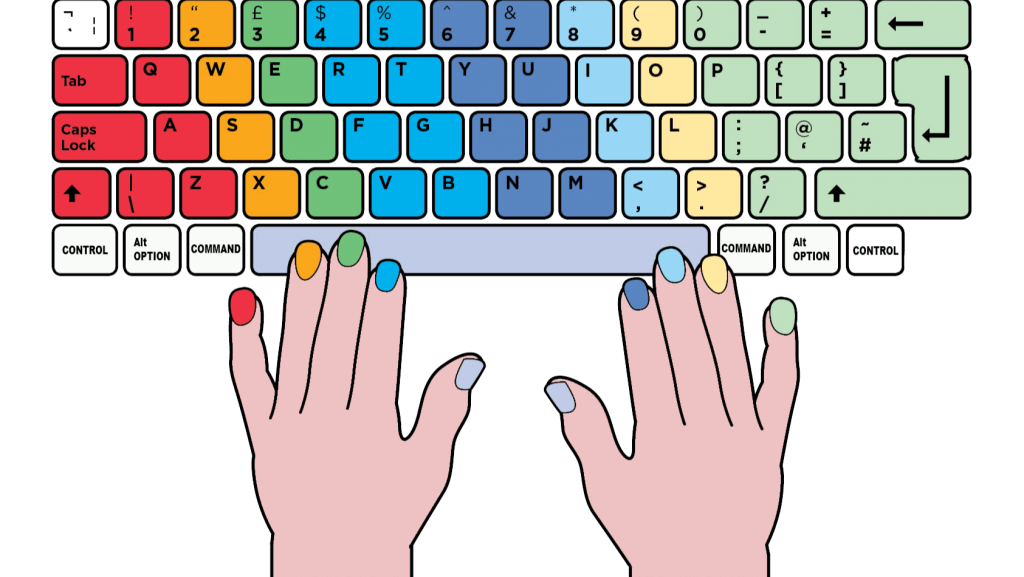
- Touch Typing: Learn touch typing, which means typing without looking at the keyboard. Familiarize yourself with the keyboard layout so you can rely on muscle memory to find the keys quickly.
- Proper Finger Placement: Position your fingers correctly on the keyboard. Place your left index finger on the "F" key and your right index finger on the "J" key. The other fingers should naturally rest on the keys adjacent to these starting points.
- Use All Fingers: Utilize all your fingers for typing, not just your index fingers. Assign each finger to specific keys to evenly distribute the workload.
- Practice Regularly: Consistent practice is essential to improve typing speed. Set aside some time each day for typing exercises or simply typing texts.
- Typing Games and Apps: There are numerous typing games and applications available online designed to help you improve your speed and accuracy. These can make practice more engaging and fun.
- Avoid Looking at the Keyboard: Resist the temptation to look down at the keys while typing. It may slow you down at first, but it will eventually help you type faster.
- Monitor Your Progress: Keep track of your typing speed and accuracy over time. Set goals and challenge yourself to improve continuously.
- Use Online Typing Tests: Take online typing tests to evaluate your progress and identify areas for improvement.
- Focus on Accuracy: While speed is essential, accuracy is equally important. Maintain a balance between typing quickly and typing accurately.
- Use Keyboard Shortcuts: Learn and use common keyboard shortcuts for tasks you frequently perform. They can save time and make you more efficient.
- Relax Your Hands: Typing should be a smooth and relaxed activity. Avoid tension in your hands and fingers, and try to keep a light touch on the keys.
- Break Down Difficult Words: For challenging words or sequences, break them down into smaller parts and practice typing them individually before typing the whole word.
- Read While Typing: Read ahead while typing to anticipate the next words or phrases. This can help you maintain a steady flow and reduce hesitations.
- Stay Patient: Improving typing speed takes time and patience. Be persistent, and don't get discouraged if you don't see immediate results.